


Step1
Taking the backup of the primary account on the Old hosting account
- Login to the Old hosting account
- Go to file manager, search and Compress the public_html folder
- Download the compressed file on your PC
Step2
If you have created email accounts with the primary account
- On your Old cPanel dashboard>>Go to file manager>>Open the mail folder and Compress the folder of the primary account and download on your PC
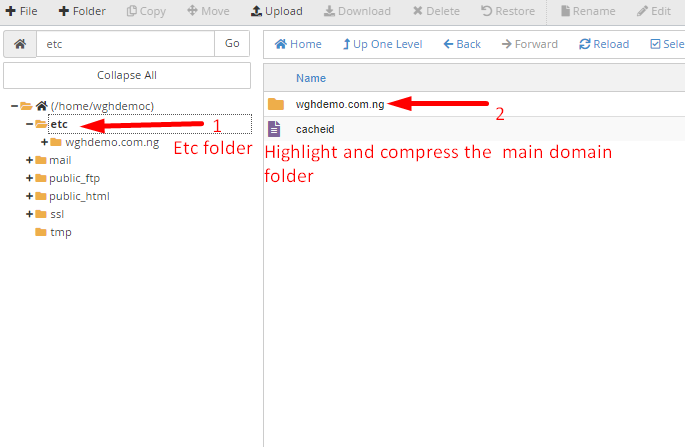
- On your Old cPanel dashboard>>Go to file manager>>Open the etc folder and Compress the folder of the primary account and download on your PC
Step3; Export all the databases for each addons on your PC from
- On your cPanel dashboard>>Click on phpmyadmin>>click on database name>>click on export as shown: http://prntscr.com/rdc0is
- After all files has been successfully downloaded
- Ensure that the primary domain no longer points to the old hosting account
==='''Restoring the backups on the new hosting account'''===
*Login to the New hosting account
*Create the domain as an addon
*On your new cPanel dashboard>>Go to file manager>>Open public_html>>Upload the public_html backup file from your PC>>Extract the files into the folder of the addon
*On your new cPanel dashboard>>Go to file manager>>Open the mail folder>>Upload the mail backup file from your PC>>Extract the files into the folder of the addon
*On your new cPanel dashboard>>Go to file manager>>Open the etc folder>>Upload each etc backup file from your PC>>Extract the files into the folder of the addon
'''N:B;Check the file/folders permissions'''
Mail folder must be 0751
Etc folder must be 0750
Public_html folder must be 0750
Check under **email accounts** option to be sure all emails are showing[if they are not do update the ticket so we can assist further]
==='''For the database'''===
*Create the database for the addon, the database name, database username and database password[Remember this is a new account with a different username you will need to update the configuration file with the new database details]
*Import the database from your PC to the phpMyAdmin
*On your new cPanel dashboard>> phpMyAdmin>click on database name>click on import as shown: http://prntscr.com/rdc0is